



Why Uploads Fail During Form GST REG-01 Filing
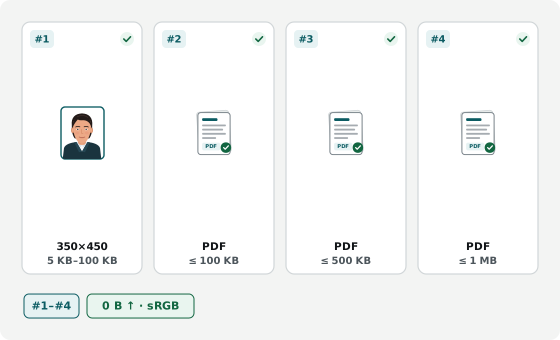
Filings stall when colour stamp-paper rent agreements exceed 1 MB (1,048,576 bytes), board resolutions miss 100 KB, or PDFs are dropped into the JPEG-only photo tab. Use the 4 workbenches below to crop your sRGB portrait, merge utility bills with consent letters under 500 KB, and compress multi-page deeds. Client proofs, bills, and deeds stay in browser memory with zero server uploads.
The GST Portal checks file format and slot-specific byte caps across Form GST REG-01, while officers verify scan clarity and address matching.
Fitting Multi-Page Stamp-Paper Deeds Under 1 MB
Notarized lease agreements and partnership deeds span multiple e-stamp and covenant pages that exceed 1 MB (1,048,576 bytes) when scanned in colour. Downsampling at 200 DPI and enabling grayscale removes heavy colour noise while keeping stamp numbers and signatures crisp.
Clearing the 100 KB Signatory and 500 KB Utility Caps
Authorized Signatory proof (Letter of Authorization or Board Resolution) enforces a tight 100 KB cap suited to 150 DPI scans; sole proprietors need no separate LoA for themselves. Principal Place dropdowns accept one file up to 500 KB (200 DPI), so merge your utility bill and owner NOC when filing consented premises.
Avoiding Form GST REG-03 Clarification Notices
- JPEG only for photographs: The Promoters photo tab rejects PDFs; upload a .jpg portrait under 100 KB.
- Match address text word-for-word: Floor, building, street, and PIN typed in REG-01 must match the uploaded bill or Municipal Khata.
- Check thermal bill legibility: Verify consumer number, owner name, and premise address remain clear after compression.