
tweakmyfile

Combine & Compress PDFs Under 8 MB for Netherlands IND in your browser

Online applications with the Dutch Immigration and Naturalisation Service (IND) cap each uploaded document at 8 MB and all attachments combined at 40 MB, and this page formats your files in your browser.

≤ 8 MBTotal ≤ 40 MBMerge + Fit
0 file bytes uploaded • 100% browser-only
Select or drop one or more PDF or image files to combine and fit locally in your browser.
Target: ≤8 MB

Drop your documents or page scans here, or click to browse

Accepts PDF, JPEG, PNG, WebP, HEIC. Files stay in browser memory and are never uploaded to any server.

Select Files From Device

Output options

Compliance Checklist

  • File size

    Required: <= 8 MB

    pending
  • Page count

    Awaiting build

    pending
  • Forms flattened

    Awaiting build

    pending
  • Text layer

    Awaiting build

    pending
  • Filename

    Required: ind-supporting-documents.pdf

    pending

Document Pipeline & Upload Readiness Guide

Combine scans and forms into one clean, unlocked PDF strictly under the portal byte limit.

Netherlands IND Online Application PDF (8 MB) — ≤ 8 MB · Total ≤ 40 MB · Merge + Fit
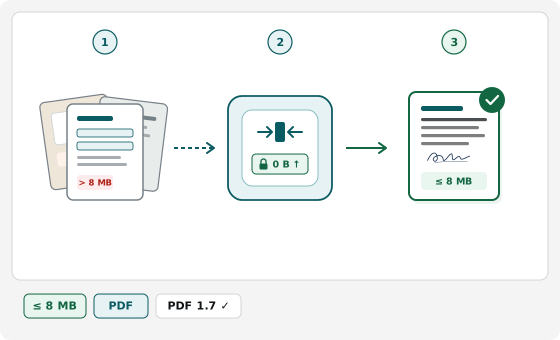
  1. 1. Scans & forms PDF · JPG · PNG
  2. 2. Merge, flatten & fit 0 B ↑
  3. 3. Verified portal PDF ≤ 8 MB
Compliant

Flat, legible pages under cap

Upright pages combined in order with readable text and verified byte size.

Avoid

Password-locked or XFA forms

Encrypted bank statements and dynamic XFA PDFs cannot be merged until unlocked.

Avoid

Dark angled desk shadows

Skewed dim phone photos bloat megabytes and make fine print unreadable to officers.

Avoid

Loose files in single-file slots

Uploading a second file to single-slot portals overwrites your previous document.

Official Netherlands IND Document Upload Specifications

Single source of truth rendered directly from verified portal rules (Netherlands IND Online Application PDF (8 MB)).

Last verified:
Parameter Official Requirement Compliance Notes
Maximum File Size <= 8 MB (8,388,608 bytes) Strictly enforced per-file upload ceiling
Total Application Upload Cap <= 40 MB (41,943,040 bytes) across all uploaded files Cumulative portal limit across all document slots
Accepted Input Formats PDF (.pdf / application/pdf), JPEG (.jpg / image/jpeg), PNG (.png / image/png), WebP (.webp / image/webp), HEIC (.heic / image/heic) Multiple files can be combined into one single PDF
Forms & Annotations Recommended Flattening prevents viewer compatibility errors on portal review
Text Layer Preserved when possible Keeps selectable text unless rasterizing is needed to meet byte cap
Output Filename ind-supporting-documents.pdf Rules: ASCII characters only (no accents), no spaces, max 60 characters
Official Portal Rules — IND Uploading Documents: "Maximum file size per document: 8 MB ("Maximale bestandsgrootte is 8 MB"); maximum total size for all documents combined: 40 MB" (encoded as 8 MiB = 8,388,608 bytes and 40 MiB = 41,943,040 bytes).
Official Portal Rules — IND Uploading Documents: "Only upload PDFs without password protection" — accepted formats are PDF and JPG/JPEG.
Official Portal Rules — IND Uploading Documents: "You cannot upload a PDF portfolio with combined PDF files because our system cannot open them" — combine pages into a single flat PDF per document category instead.
Verified directly against the primary government specification bulletin.

Official Sources & Verification Status

Every byte ceiling, pixel frame, and document constraint on this page is cross-checked directly against published agency instructions. How we verify portal rules

Immigration and Naturalisation Service (IND — Immigratie- en Naturalisatiedienst)

Last verified:
Active rules: ≤ 8 MB Total ≤ 40 MB Merge + Fit

How to Merge and Compress Documents for IND

  1. Add pages for one IND category

    Select all PDFs or photos for one upload slot — such as passport stamp pages, an apostilled certificate with translation, or payslips.

  2. Order pages and watch total weight

    Arrange pages chronologically and toggle grayscale on dense scans when sharing the 40 MB total budget across many files.

  3. Build a standard PDF under 8 MB

    Click Build Compliant PDF to save ind-supporting-documents.pdf below 8 MB and check that text and stamps stay legible.

Why Online Uploads Fail on the Dutch IND Portal

Uploads fail when passport scans exceed 8 MB, bank or payslip PDFs carry password protection, or files sit inside an Adobe PDF Portfolio that IND cannot open. Drop PDFs, JPEGs, PNGs, or HEIC photos to build one standard, unencrypted PDF below 8 MB while conserving your 40 MB application cap. Your passports, payslips, and civil records stay in browser memory with zero server uploads.

Across Mijn IND, DigiD forms, GVVA filings, and sponsor portals, upload errors trace to PDF Portfolios, dual byte caps, and password-locked PDFs.

Why IND Rejects PDF Portfolios vs Merged PDFs

IND rules warn that you cannot upload a PDF Portfolio with combined files because caseworker software cannot open portfolio containers. A portfolio wraps separate sub-files inside an envelope, whereas merging pages here writes one flat sequential PDF under 8 MB (8,388,608 bytes) that opens everywhere.

Balancing the 8 MB File Cap and 40 MB Total Ceiling

Even when individual files sit below 8 MB, uploading several heavy colour scans quickly breaches the 40 MB (41,943,040 bytes) application total. Downsampling camera images and toggling grayscale on contracts or stamp pages leaves ample headroom.

Passwords, Formats, and Legalised Civil Records

  • Unlock password-protected PDFs: IND blocks encrypted files; export bank statements or e-payslips unlocked before combining.
  • Convert HEIC and PNG photos: IND accepts PDF and JPG only, so converting phone scans into one PDF prevents format errors.
  • Pair apostilles and translations: Combine both sides of legalised civil certificates with the sworn translation in one file.

Netherlands IND PDF Upload FAQs

Per-file vs total MB caps, PDF Portfolio blocks, and local privacy.

How do I fix the Mijn IND red banner "Maximale bestandsgrootte is 8 MB" (and 40 MB total limit)?
Upload step Exact portal message
Maximale bestandsgrootte is 8 MB — Waarschuwing te groot document in online aanvraag (max 40 MB total)
Why it happens
In Mijn IND, any single PDF over 8 MB triggers the Dutch red banner, while exceeding 40 MB across all attachments blocks submission or corrupts saved .tfa application drafts.
How to fix it
Merges PDF, JPEG, PNG, WebP, and HEIC pages and compresses each document strictly below 8 MB while tracking your cumulative 40 MB application budget.
Why does IND say "You cannot upload a PDF portfolio with combined PDF files"?
Validation check Exact portal message
You cannot upload a PDF portfolio with combined PDF files. / U kunt geen map of portfolio met samengevoegde pdf-bestanden uploaden.
Why it happens
IND caseworker software cannot open Adobe PDF Portfolios (Collection wrappers) or password-protected bank and salary-slip PDFs (wachtwoord).
How to fix it
Blocks PDF Portfolios and password-encrypted PDFs upfront and combines your separate unlocked files into a standard flat sequential PDF under 8 MB with a clean single-dot ASCII filename.
How do the 8 MB file limit and 40 MB total limit work on IND.nl?

No single file may exceed 8 MB, and all uploaded files combined cannot exceed 40 MB. Keeping each merged PDF compact protects your 40 MB budget.

Why did IND reject my bank statement or salary slip PDF?

Banks and payroll portals often lock downloaded PDFs with passwords or permissions. Save an unlocked copy first, then merge and compress here.

Are my passport or residence files uploaded to any server?

No. Merging, conversion, and compression execute locally in your browser with zero network uploads.