
tweakmyfile
English Deutsch

Combine & Compress PDFs Under 10 MB for uni-assist in your browser

German university applications in My assist (uni-assist) accept PDF files only up to 10 MB per document, and this page merges and compresses your files in your browser.

≤ 10 MBPDF · JPG · PNGMerge + Fit
0 file bytes uploaded • 100% browser-only
Official rules: uni-assist e. V. (My assist) Last verified:
Select or drop one or more PDF or image files to combine and fit locally in your browser.
Target: ≤10 MB

Drop your documents or page scans here, or click to browse

Accepts PDF, JPEG, PNG, WebP, HEIC. Files stay in browser memory and are never uploaded to any server.

Select Files From Device

Output options

Compliance Checklist

  • File size

    Required: <= 10 MB

    pending
  • Page count

    Awaiting build

    pending
  • Forms flattened

    Awaiting build

    pending
  • Text layer

    Awaiting build

    pending
  • Filename

    Required: uni-assist-application-documents.pdf

    pending

Document Pipeline & Upload Readiness Guide

Combine scans and forms into one clean, unlocked PDF strictly under the portal byte limit.

uni-assist My assist Application PDF (10 MB) — ≤ 10 MB · PDF · JPG · PNG · Merge + Fit
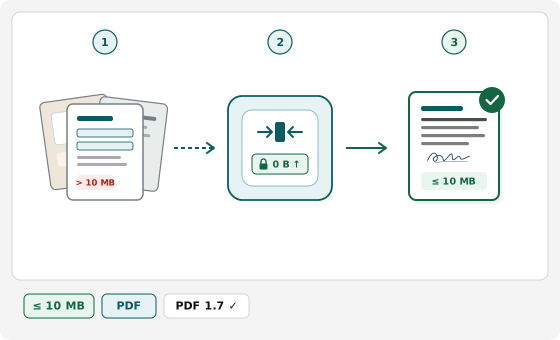
  1. 1. Scans & forms PDF · JPG · PNG
  2. 2. Merge, flatten & fit 0 B ↑
  3. 3. Verified portal PDF ≤ 10 MB
Compliant

Flat, legible pages under cap

Upright pages combined in order with readable text and verified byte size.

Avoid

Password-locked or XFA forms

Encrypted bank statements and dynamic XFA PDFs cannot be merged until unlocked.

Avoid

Dark angled desk shadows

Skewed dim phone photos bloat megabytes and make fine print unreadable to officers.

Avoid

Loose files in single-file slots

Uploading a second file to single-slot portals overwrites your previous document.

Official uni-assist (My assist) Document Upload Rules

Single source of truth rendered directly from verified portal rules (uni-assist My assist Application PDF (10 MB)).

Last verified:
Parameter Official Requirement Compliance Notes
Maximum File Size <= 10 MB (10,485,760 bytes) Strictly enforced per-file upload ceiling
Accepted Input Formats PDF (.pdf / application/pdf), JPEG (.jpg / image/jpeg), PNG (.png / image/png), WebP (.webp / image/webp), HEIC (.heic / image/heic) Multiple files can be combined into one single PDF
Forms & Annotations Recommended Flattening prevents viewer compatibility errors on portal review
Text Layer Preserved when possible Keeps selectable text unless rasterizing is needed to meet byte cap
Output Filename uni-assist-application-documents.pdf Rules: ASCII characters only (no accents), no spaces, max 60 characters
Official Portal Rules — uni-assist Upload Documents (My assist): "You can only upload PDF files" / "Sie können ausschließlich PDF-Dateien hochladen."
Official Portal Rules — uni-assist Upload Documents: "Each file can be a maximum of 10 MB in size" / "Jede Datei darf maximal 10 MB groß sein" (encoded as 10 MiB = 10,485,760 bytes).
Official Portal Rules — uni-assist Upload Documents: PDF files must be complete, clearly legible, and not password-protected; do not re-compress PDFs that carry a verifiable cryptographic university e-seal.
Verified directly against the primary government specification bulletin.

Official Sources & Verification Status

Every byte ceiling, pixel frame, and document constraint on this page is cross-checked directly against published agency instructions. How we verify portal rules

Active rules: ≤ 10 MB PDF · JPG · PNG Merge + Fit

How to Prepare Application PDFs for My assist

  1. Add pages for one document category

    Select all PDFs or scans belonging together — such as front-and-back diplomas, grading scales, and sworn translations, or a module handbook.

  2. Order pages and review options

    Arrange credentials, grading keys, and translations chronologically; enable grayscale if heavy colour scans inflate size.

  3. Build and verify under 10 MB

    Click Build Compliant PDF to generate uni-assist-application-documents.pdf below 10 MB, check stamp and grade legibility, and upload to My assist.

Why Academic Uploads Fail in My assist

Uploads fail when submitting raw phone photos of certificates, password-protected registry files, or oversized module handbooks (Modulhandbücher). Drop PDFs, JPEGs, PNGs, or HEIC scans to arrange pages and build one unencrypted PDF below 10 MB with legible text. Your transcripts and ID scans remain in local browser memory with zero server uploads.

When applying to German universities via My assist, rejections stem from non-PDF formats, oversized syllabi, encryption locks, or broken digital seals.

Shrinking Module Handbooks (Modulhandbücher) Under 10 MB

University module handbooks often bundle faculty-wide catalogs and cover graphics that exceed 10 MB (10,485,760 bytes). Our pipeline strips metadata and downsamples embedded images first so selectable course descriptions stay sharp beneath 10 MB. If a catalog spans hundreds of unrelated pages, extract your completed modules before compressing.

Fixing "Corrupt or Password Protected" and Format Errors

My assist rejects raw .jpg, .png, and .heic uploads — every file must be a .pdf. Electronic transcripts or score reports locked with a viewer or owner password trigger "Your file may be corrupt, password protected or there are other technical issues" and must be saved unlocked first.

Digital E-Seals and Central Document Pool Tips

  • Do not re-compress cryptographically sealed PDFs: If an official e-transcript carries a verifiable digital university e-seal and already sits below 10 MB, upload the original untouched so verification stays valid.
  • Include reverse sides and grading scales: Combine the diploma, transcript, official grading scale, and certified translation into one complete PDF.
  • Shared across semester choices: Documents uploaded to your My assist pool apply across all selected German universities.

uni-assist PDF Upload FAQs

Module handbook caps, password errors, and digital e-seals.

Why does My assist (uni-assist) say "Could not upload the file. Your file may be corrupt, password protected..."?
Upload step Exact portal message
Could not upload the file. Your file may be corrupt, password protected or there are other technical issues preventing it from uploading.
Why it happens
My assist throws this error when a transcript PDF carries password/owner encryption, Adobe PDF Portfolio wrappers, or scanner stream errors — while re-saving an already <10 MB e-sealed PDF breaks its university signature.
How to fix it
Detects encryption locks, PDF Portfolios, and digital e-seals upfront (warning you to upload <10 MB e-sealed PDFs untouched) and rebuilds unsigned scans into a clean, flattened PDF under 10 MB.
How do I fix "The selected file is too large" (≤10 MB) on uni-assist?
Upload step Exact portal message
The selected file is too large — Each file can be a maximum of 10 MB in size.
Why it happens
Multi-page colour degree scans, high-DPI transcripts, or university module handbooks (Modulhandbücher) exceed uni-assist's 10 MB per-file limit, and loose .jpg, .png, or .heic photos are rejected.
How to fix it
Merges PDF, JPEG, PNG, WebP, and HEIC pages and downsamples embedded images below 10 MB while keeping syllabus and transcript text selectable.
What causes the uni-assist "Bad Request" upload error message?
Upload step Exact portal message
A firewall may prevent the uploading of your documents. If so, you will see the error message “Bad Request”.
Why it happens
my.uni-assist.de returns HTTP 400 "Bad Request" when filenames contain non-ASCII characters, spaces, or multiple dots, or when a campus firewall, VPN, or browser extension interrupts the upload.
How to fix it
Exports a clean, space-free, single-dot ASCII filename (≤60 characters) with metadata stripped; if "Bad Request" persists on a compliant PDF, disable your VPN or ad-blocker and retry.
Should I compress an e-transcript that has a digital university signature?

No, if it is already under 10 MB and unencrypted. Re-saving a cryptographically signed PDF invalidates its electronic seal; use this tool for paper scans, module handbooks, and CVs.

How do I shrink a university module handbook below 10 MB?

Drop the PDF above to downsample heavy graphics while keeping text selectable, or export only the pages covering your completed courses first.

Are my transcripts uploaded to an external server?

No. Conversion, merging, and compression run locally in your browser with zero server uploads.